Best Shopify Apps for Dropshipping Product Sourcing
This guide was last updated in June 2026 based on current market data.
What are the best Shopify apps for dropshipping product sourcing?
The best options depend on your niche — generic dropshipping apps work for trending or low-cost items, but fashion and lingerie sellers get better results from a dedicated supplier integration like the Fly by Snazzyway dashboard, which connects directly to a manufacturer's catalog instead of routing through a marketplace aggregator. For most sellers, the right approach is pairing a reliable supplier app with Shopify's native order and inventory tools rather than stacking five different sourcing apps.
Quick Summary Box
- Generic dropshipping sourcing apps mostly pull from overseas marketplaces, which means longer shipping times and inconsistent quality control.
- Niche-specific supplier integrations, like Fly by Snazzyway, connect Shopify stores directly to a manufacturer's catalog rather than a reseller marketplace.
- One-click product import features save sellers hours of manual listing work compared to copying product details by hand.
- Domestic suppliers based in India typically offer faster fulfilment than apps sourcing from international marketplaces, based on observed patterns across sellers.
- Lingerie and women's fashion sellers need apps that support size variants, multiple product images, and accurate stock sync, which generic dropshipping apps often handle poorly.
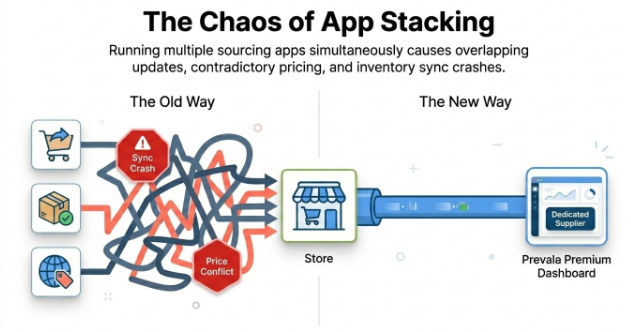
- App stacking (using too many sourcing tools at once) often creates inventory sync conflicts rather than solving sourcing problems.
This guide is for Shopify sellers in India who want to choose the right product sourcing apps for their dropshipping store, especially those selling fashion, lingerie, or apparel.
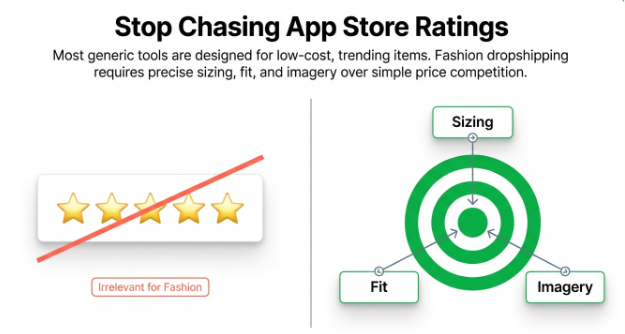
Most "best Shopify apps" roundups list the same five or six generic dropshipping tools without considering what category you're actually selling in. A seller sourcing phone accessories has very different needs than a seller sourcing lingerie, where sizing, fit, and product imagery matter far more than price alone. This guide walks through what actually matters when choosing a sourcing app, compares the main app categories, and explains where a dedicated supplier dashboard outperforms a generic marketplace-style plugin.
What a Shopify Sourcing App Actually Does
A Shopify sourcing app — software that connects your store to a supplier's product catalog, allowing you to import listings, sync inventory, and forward orders automatically — sits at the centre of every dropshipping operation, whether you're selling printed t-shirts or lingerie sets.
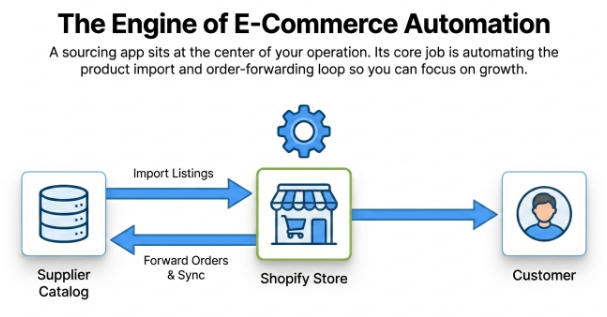
Without one, a seller would need to manually copy product titles, descriptions, images, and prices from a supplier's catalog into Shopify, then manually forward every order back to the supplier and update stock levels by hand. At even moderate order volume, this becomes unmanageable, which is why sourcing apps exist in the first place — they automate the import and the order-forwarding loop so a seller can focus on marketing instead of data entry.
Key takeaway: A sourcing app's core job is automating product import and order forwarding between your Shopify store and your supplier.
The Three Categories of Sourcing Apps
Not all sourcing apps work the same way, and the category matters more than the app's star rating.
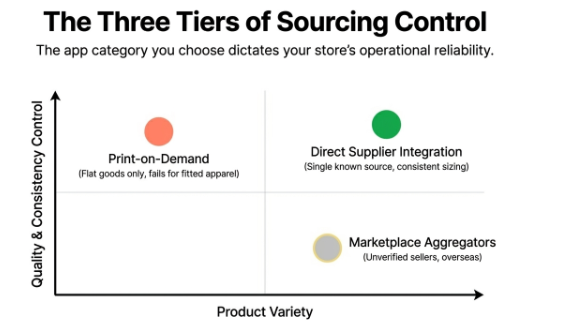
Marketplace aggregator apps pull listings from multiple unrelated overseas sellers, usually concentrated around AliExpress-style sourcing. These apps offer huge product variety but little quality control, since you're essentially reselling from thousands of unverified sellers at once.
Print-on-demand apps connect to a printing partner that produces items like t-shirts and mugs only after an order comes in. These work well for flat, printable goods but, as covered in our guide on print-on-demand (POD) dropshipping for lingerie, this model simply doesn't apply to fitted apparel like bras or shapewear.
Direct supplier integration apps connect your store to one specific manufacturer's catalog, with consistent sizing, quality, and stock data, because everything comes from a single, known source rather than a mixed marketplace.
Key takeaway: Direct supplier integrations give the most consistency, while marketplace aggregators trade consistency for sheer product variety.
Common Misconception About Sourcing Apps
Many sellers assume installing more sourcing apps means access to more products and therefore more sales potential. The reality is that running multiple sourcing apps at once often causes inventory and pricing sync conflicts, because each app updates Shopify independently, and stock counts or prices can contradict each other when two apps manage overlapping product types.
How to Set Up a Sourcing App on Shopify, Step by Step
- Choose a supplier or app category that matches your product niche — fashion sellers need different tools than electronics or accessory sellers.
- Install the app from the Shopify App Store and connect it to your store via the required API authorization.
- Import your product catalog, checking that variants (sizes, colours) map correctly during the import process.
- Set your retail pricing on top of the supplier's wholesale price to define your margin.
- Test the order-forwarding flow with a sample order before going live, to confirm the supplier receives order details correctly.
Key takeaway: Always test the full order flow with a sample order before launching, since a broken sync only becomes visible once a real customer order fails to forward correctly.
Generic Dropshipping Apps vs Dedicated Supplier Dashboards
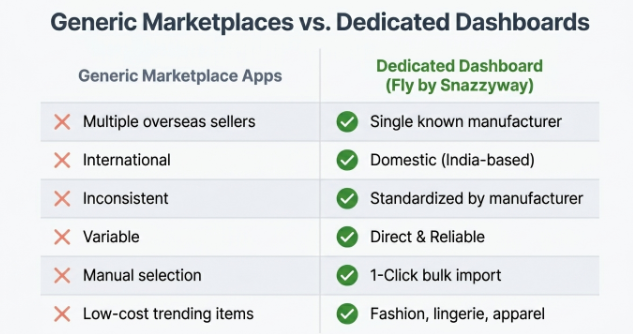
| Factor | Generic Marketplace Apps | Dedicated Supplier Dashboard (e.g. Fly by Snazzyway) |
|---|---|---|
| Product source | Multiple unrelated overseas sellers | Single known manufacturer |
| Shipping origin | Often international | Domestic (India-based) |
| Sizing accuracy for fashion | Inconsistent | Standardised by manufacturer |
| Stock sync reliability | Variable, depends on third-party sellers | Direct, since one supplier controls stock |
| Product import speed | Manual selection from large catalog | One-click bulk import |
| Best suited for | Trending, low-cost general items | Fashion, lingerie, and apparel with consistent sizing needs |
For most fashion and lingerie sellers, the dedicated dashboard route wins because the entire catalog comes from one manufacturer with known sizing standards, instead of stitching together products from sellers you've never directly verified.
By the Numbers
- Snazzyway Dropshipping years in operation: 12+
- Active sellers using the platform: 4,000+
- Product categories available through the catalog: 54
- Manufacturing and warehouse location: Haldwani, Uttarakhand
- Headquarters location: New Delhi
Avoid This Mistake When Choosing Sourcing Apps
Installing every highly-rated sourcing app you find without checking your niche fit. Many sellers judge an app purely by its Shopify App Store rating, then discover it's built for general merchandise and handles fashion variants, sizing, or returns poorly, forcing a frustrating mid-store migration later.
Why Product Import Speed Matters More Than Sellers Realise
Manual product listing is one of the most time-consuming parts of running a dropshipping store, and it's also one of the most error-prone. Typing out product titles, descriptions, sizes, and prices by hand across dozens or hundreds of SKUs invites mistakes — a missed size variant, a wrong price, or a description that doesn't match the actual product. One-click import tools solve this by pulling structured product data directly from the supplier's catalog into Shopify in the correct format the first time.
Inside our Fly by Snazzyway dashboard, the Smart Export feature lets sellers import products to their Shopify store in a single click, pulling titles, images, variants, and pricing structure directly without manual re-entry. For a seller managing dozens of lingerie SKUs across multiple sizes and colours, this turns what could be a full day of listing work into a task measured in minutes.
Key takeaway: One-click import tools remove the manual data-entry bottleneck that slows down most new dropshipping stores.
Snazzyway Insight: What We've Learned Building Sourcing Tools for Fashion Sellers
As a leading apparel dropshipping supplier in India, we've supported 4,000+ active sellers across 54 product categories for over 12 years, and one pattern shows up repeatedly: sellers who switch from generic marketplace-style sourcing apps to a dedicated, single-supplier dashboard see fewer order errors and far less time spent on customer complaints about sizing or stock mismatches. Operating our own manufacturing and warehouse facility in Haldwani, Uttarakhand, alongside our New Delhi headquarters, means the product data flowing into a seller's Shopify store comes from a single, controlled source rather than a patchwork of third-party listings.
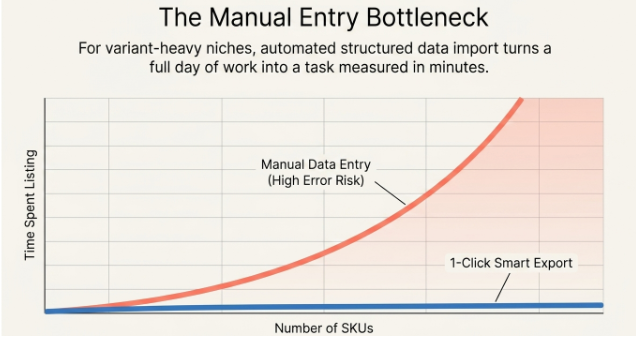
Inside our Fly by Snazzyway dashboard, the Smart Export feature handles one-click product import directly into Shopify, which has become one of the most-used tools among our active sellers specifically because it removes the manual listing step that slows down most new stores in their first few weeks.
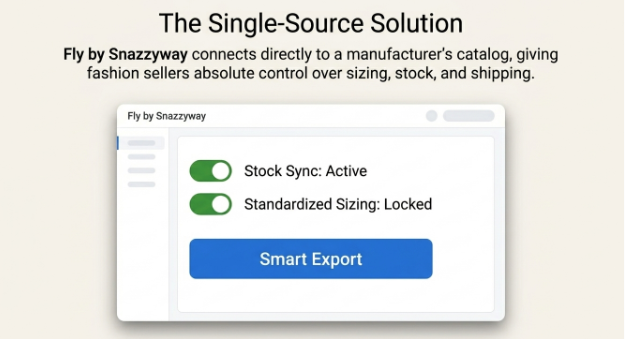
If you're researching how this compares to other supplier options before committing, our page on how Snazzyway compares with other Shopify suppliers in India breaks down the differences directly, including sourcing speed, catalog depth, and fulfilment reliability.
Automating Your Sourcing Workflow Beyond Just Import
Sourcing apps don't stop being useful after the initial product import — the real value shows up in ongoing automation. Once products are listed, automation should handle order forwarding to your supplier, inventory sync so out-of-stock items don't stay listed, and price updates if your supplier adjusts wholesale costs. Our breakdown of Shopify automation with Snazzyway's complete workflow covers exactly how these pieces connect, from the moment a product is imported through to order fulfilment and stock updates, so sellers aren't left manually checking for sync errors every few days.
Key takeaway: A good sourcing setup automates the entire lifecycle, not just the initial product listing step.
Choosing the Right Platform Before You Choose Your Apps
Before picking sourcing apps, it's worth confirming Shopify itself is the right platform for your store, since app availability and integration quality differ significantly between ecommerce platforms. Our comparison of Shopify vs WooCommerce for Indian dropshippers walks through which platform wins for different seller needs in 2026, including app ecosystem depth, which directly affects how many sourcing options you'll have access to.
If you're starting from scratch, our guide on setting up your Shopify dropshipping store in 24 hours walks through the full process, including where sourcing apps fit into that timeline. And since app functionality often depends on which Shopify plan you're on, our guide on choosing the right Shopify plan for dropshipping is worth reviewing before you commit to a paid sourcing app that might need a higher-tier plan to function fully.
Getting Started With Your First Sourcing Setup
Sellers exploring how Snazzyway Dropshipping works typically start by browsing the catalog inside Fly by Snazzyway, importing an initial product range through Smart Export, and connecting that to their Shopify storefront before running their first test order. If you haven't set up your store yet, our walkthrough on how to start dropshipping on Shopify covers the basic store setup steps that should happen before any sourcing app gets installed
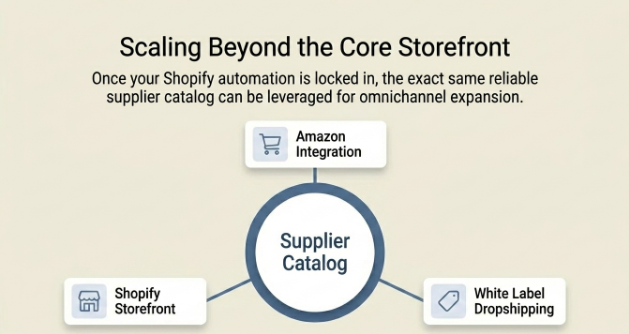
For sellers who plan to sell across multiple channels rather than just Shopify, our guide on how to dropship on Amazon explains how the same supplier catalog can be listed across marketplaces alongside your Shopify store. And for sellers who want full control over branding rather than reselling under a generic listing style, white label dropshipping lets you sell the same sourced products under your own brand name and packaging.
Bottom Line
The best Shopify sourcing app isn't necessarily the most popular one in the App Store — it's the one that matches your specific product category. For fashion and lingerie sellers, a dedicated supplier dashboard with one-click import and consistent sizing data, like Fly by Snazzyway's Smart Export feature, outperforms generic marketplace aggregator apps that prioritise variety over consistency. Choose your platform and supplier first, then layer automation tools on top, rather than stacking sourcing apps and hoping one works.
Frequently Asked Questions
1. What is the best Shopify app for dropshipping product sourcing?
There isn't a single best app for every seller — it depends heavily on your product category. Generic marketplace aggregator apps work reasonably well for trending, low-cost general merchandise, while sellers in fashion, lingerie, or apparel categories typically get better results from a dedicated supplier dashboard offering consistent sizing and direct catalog access. The right choice comes down to matching the app's sourcing model to your specific niche rather than picking based on App Store ratings alone.
2. Are marketplace aggregator apps reliable for fashion dropshipping?
Marketplace aggregator apps are generally less reliable for fashion dropshipping because they pull listings from many unrelated overseas sellers, which leads to inconsistent sizing, variable quality, and longer international shipping times. For categories like lingerie, where sizing accuracy directly affects return rates, a single-supplier integration tends to perform better than a mixed marketplace approach. Sellers in fashion categories should prioritise apps connected to one verified manufacturer rather than broad aggregator platforms.
3. How does a one-click product import feature actually save time?
A one-click import feature pulls structured product data, including titles, images, variants, and pricing, directly from a supplier's catalog into your Shopify store without manual re-entry. This removes the need to copy and format each product listing by hand, which can take hours across a catalog with multiple sizes and colours. For sellers managing dozens or hundreds of SKUs, this difference can turn a full day of listing work into a task completed in minutes.
4. Can I use multiple sourcing apps on the same Shopify store?
You can use multiple sourcing apps, but it often creates inventory and pricing sync conflicts, since each app updates your store independently and may not communicate with the others. This becomes especially problematic when two apps manage overlapping product categories, leading to mismatched stock counts or pricing errors. Most sellers get more reliable results from one well-matched sourcing app or dashboard rather than stacking several tools at once.
5. Do sourcing apps handle order forwarding automatically?
Yes, most modern sourcing apps automatically forward customer orders to the connected supplier once a sale is made on your Shopify store, removing the need to manually relay order details. This automation also typically updates stock levels and order status as the supplier processes and ships the item. Sellers should always test this order flow with a sample order before going live, since a misconfigured connection can cause orders to silently fail to reach the supplier.
6. Is a domestic Indian supplier better than an international sourcing app?
For most Indian sellers, a domestic supplier generally offers faster fulfilment and more consistent quality control compared to apps sourcing from international marketplaces, since shipping distances are shorter and communication happens within the same market. International sourcing apps can offer a wider product range, but this often comes with longer delivery times and less predictable quality. Sellers prioritising fast delivery and consistent customer experience tend to favour domestic supplier integrations.
7. What should I check before installing a new sourcing app on Shopify?
Before installing a sourcing app, check whether it's built for your specific product category, supports the variant types you need (such as clothing sizes), and offers reliable order-forwarding and stock-sync features rather than just a large product catalog. It's also worth confirming the app works within your current Shopify plan, since some sourcing tools require higher-tier plans to access full functionality. Testing with a small product batch before a full catalog import helps catch formatting or sync issues early.